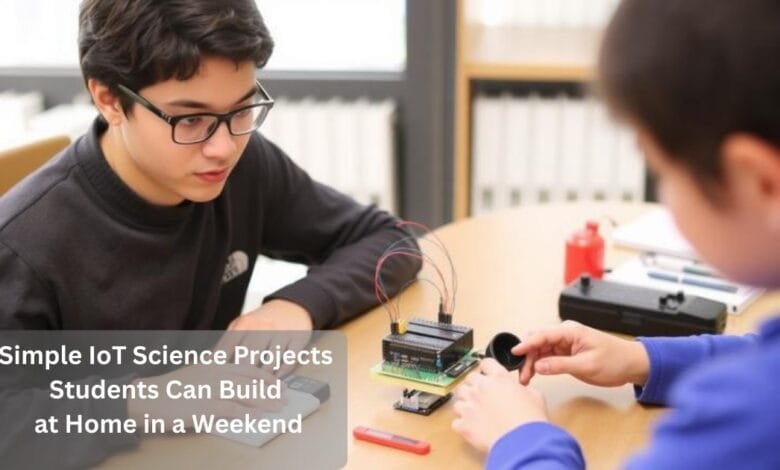
Pretty wild how fast things change, right? Today, students can build devices that talk to the internet and solve real problems.
And the best part? Simple IoT projects aren’t just for tech wizards anymore.
You don’t need a fancy degree or expensive gear, just a free weekend, a few budget-friendly components, and some genuine curiosity.
That’s really all it takes to create working smart gadgets, whether you’re monitoring houseplants, logging weather patterns, or automating everyday chores.
Why Start with IoT Projects Today
Listen, the moment to jump into connected device building? It’s right now.
According to IoT Analytics, the number of connected IoT devices worldwide reached about 18.8 billion by the end of 2024, and is projected to grow to ≈ 21.1 billion by the end of 2025.
This isn’t some passing fad; it’s fundamentally reshaping everything from medical care to farming.
Here’s what makes this exciting for you: students who build these systems now. They’re stacking advantages. Not memorizing abstract theory, but assembling real functioning prototypes that showcase actual problem-solving abilities.
Getting Started Without Breaking the Bank
Most iot science projects for students will set you back less than buying the latest video game release.
An Arduino Uno or ESP8266 board? Maybe ten to fifteen bucks.
Basic sensors like temperature readers or motion detectors? Toss in a few more dollars.
Beginner kits that include everything, jumper wires, breadboards, and various sensors, typically cost under fifty dollars. That’s honestly nothing when you consider how these skills compound over time, through school, and into your career path.
What makes this even better: you won’t be soldering anything or wrestling with complicated wiring at first. Today’s development boards come with plug-and-play connections that let you concentrate on understanding concepts instead of fighting technical assembly headaches.
Connecting Your Projects Anywhere
Building mobile IoT solutions that need connectivity outside your home WiFi network?
That’s where cellular options enter the picture. Students creating portable weather stations or remote monitoring setups quickly realize that flexible data plans and reliable coverage from the best global esim providers can keep their projects connected without fumbling with physical SIM cards.
This becomes genuinely valuable when you’re deploying projects across multiple locations or testing outdoor applications that depend on a steady internet for cloud data logging and remote alerts.
Essential Components for Weekend Builds
Before diving into any build, you’ll want some fundamental hardware ready. Let’s cut through the noise and talk about what beginners actually need.
Your First Development Board
Arduino Uno? Still the champion for first-timers. It forgives mistakes easily, and there’s an enormous community ready to help when things go sideways. The ESP8266 NodeMCU brings built-in WiFi capability at roughly the same price, which makes it fantastic for internet-connected builds. Both boards use identical programming environments, so what you learn on one transfers straight to the other.
Don’t overthink this choice, either board handles everything we’re about to discuss beautifully.
Sensors That Make Projects Smart
Temperature and humidity sensors (specifically the DHT11) cost around two dollars and unlock ridiculous possibilities. Motion detectors (PIR sensors) run just as cheaply and power security applications.
Ultrasonic distance sensors measure anything from water tank levels to whether your garage parking spot is occupied. Just these three sensor varieties support literally dozens of home IoT projects addressing practical everyday challenges.
Free Software That Powers Everything
Arduino IDE downloads at zero cost from Arduino’s official site and runs on Windows, Mac, or Linux machines. That’s where you’ll write your code and push it to your board.
Blynk gives you a free mobile app platform for controlling projects straight from your phone, with zero app development knowledge required. IFTTT links your projects to hundreds of web services, enabling automation that would otherwise demand serious programming chops.
Three Perfect Projects for Your First Weekend
These builds assume minimal background but deliver results impressive enough to fuel your continued learning journey.
Smart Plant Guardian
Your introduction to weekend IoT projects might begin with a moisture-sensing plant care system. A soil moisture sensor inserted into your plant’s soil reads exactly how parched things have gotten. When moisture drops below your threshold, the system either triggers a water pump or fires off a notification to your phone.
Those identical monitoring principles translate perfectly to keeping your houseplants alive. You’ll connect the sensor to your Arduino, write straightforward code checking readings hourly, and configure alerts through Blynk.
The complete build takes maybe two to three hours and runs under twenty-five dollars.
Weather Tracking Station
Constructing your personal weather station demonstrates how multiple sensors collaborate. You’ll merge temperature, humidity, and optionally barometric pressure sensors to gather hyperlocal weather information.
The ESP8266’s WiFi functionality enables uploading readings to ThingSpeak or comparable cloud platforms, generating graphs and historical records you can access from literally anywhere.
This project introduces data logging fundamentals that underpin countless IoT applications. Bonus: you’ll earn bragging rights when your homemade station outperforms commercial weather apps for your exact microclimate.
Motion-Sensing Room Alert
A PIR motion sensor connected to your Arduino detects movement and triggers responses, activating lights, dispatching notifications, or recording activity timestamps. This represents one of the most useful easy IoT projects for beginners because it solves tangible problems like home security or cutting energy waste.
The programming stays incredibly simple: detect motion, then do something. Yet you’re absorbing critical concepts about event-driven programming and real-time system response that professional deployments depend on.
Taking Your Skills Further
After successfully wrapping your first basic build, you’ll probably want to expand both capabilities and complexity.
Adding Voice Commands
Connecting with Alexa or Google Assistant isn’t nearly as intimidating as it initially seems. Multiple free services bridge Arduino projects to voice assistants using straightforward API calls. Picture saying, “Alexa, water my plant” and watching your homemade system actually respond. That’s completely achievable with one additional weekend of effort once you’ve nailed the basics.
Machine Learning on Microcontrollers
TensorFlow Lite currently runs on Arduino-class hardware, enabling pattern recognition and predictive capabilities. Your weather station could forecast rain by analyzing pressure trends. Your plant monitor might adapt watering schedules based on seasonal patterns. These advanced features demand more study but grow organically from foundational skills.
Going Solar for Sustainability
Incorporating a compact solar panel and battery management converts projects from desktop curiosities into legitimate outdoor deployments. A five-watt panel costs roughly fifteen dollars and can power sensor projects indefinitely in decent sunlight. This upgrade teaches power management principles while making projects eco-friendly.
Your Next Steps in IoT Creation
Everything you need to start building is ready this weekend. Choose whichever project sounds most appealing, order a basic kit online (shipping takes days, not weeks), and jump in. Here’s what makes these builds special: failures teach you at least as much as successes, honestly, probably more.
Don’t chase perfection on attempt number one. Chase learning. Chase that incredible moment when your code compiles cleanly and your LED blinks precisely as you intended. Those tiny victories accumulate into legitimate skills way faster than you’d imagine. The connected device revolution needs creators, not just consumers, and you can become one starting this weekend.
Common Questions About Getting Started
Do I need programming experience to build these projects?
Honestly? Not really. Basic Arduino sketches use straightforward commands that make intuitive sense. Most projects include example code you’ll modify rather than creating from scratch. Programming knowledge develops naturally through hands-on experimentation.
Which sensors should beginners buy first?
Grab a DHT11 temperature/humidity sensor and a PIR motion detector to start. These two cover the broadest range of beginner-friendly projects and together cost under five bucks. Your next purchase should be an ultrasonic distance sensor for roughly three dollars more.
Can projects work without a constant internet connection?
Totally, plenty of functions operate entirely offline, storing data locally or operating autonomously. Internet connectivity adds cool features like remote monitoring, but it is definitely not mandatory for grasping core concepts or building functional systems.
Check more articles on – Piokok Home Page